
Smart Playlists
Generator playlists (also called smart or filter playlists) allow you to create derivative playlists based on the content of another playlist. This is the main way of creating a filtered view of a playlist.
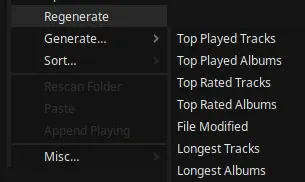
Creating Preset Generator Playlists
Section titled “Creating Preset Generator Playlists”The quickest way to create a generated playlist is using a preset:
- Right click a playlist tab
- Select “Generate…”
- Choose a preset from the menu
Regenerating Playlists
Section titled “Regenerating Playlists”Once a generated playlist has been created, you can reload it:
- Right click the playlist tab
- Select “Regenerate”
This updates the playlist based on any changes to the source playlist.
Auto-Regenerate
Section titled “Auto-Regenerate”By default, you need to manually regenerate playlists. To enable automatic updates:
Globally:
- Go to MENU > Settings…
- Enable “Auto regenerate playlists”
Per Playlist:
- Edit the generator and add the code
auto
Manual Generator Creation
Section titled “Manual Generator Creation”You can create custom generator playlists with specific combinations of searches, filters, and sorters:
- Right click a playlist tab
- Select “Misc…” > “Edit generator…”
- Enter generator codes
Code Format
Section titled “Code Format”There are 4 types of codes: Selectors, Searchers, Filters and Sorters. Only one search code is required at minimum.
The order is important. Typically you:
- Select any particular playlists to restrict search scope to (optional)
- Perform a search or simply add all tracks using the
acode - Add any filters or sorters (optional)
For example, if you wanted a playlist of all your loved tracks you could use: a l. If you wanted all loved tracks from only a specific playlist, you could use: s"MyPlaylist" a l
If you wanted all loved tracks from a specific artist, you could use: a"Artistname" l
Select source playlists
Section titled “Select source playlists”| Function | Code example | Notes |
|---|---|---|
| Add playlist to selection | s"Name of Playlist" | If no selection is made, all playlists will be selected |
| Clear selection | clr | Selects all playlists as per above rule |
| Select current playlist | self | This is a special code that makes the selection the playlist itself. Useful when combined with auto and any sorters to re-sort tracks on import. Using any filter codes with this will be destructive. |
Search from selected playlists
Section titled “Search from selected playlists”| Function | Code example | Notes |
|---|---|---|
| Search artist | a"Artist Name" | This is a search term, so it can be fuzzy like: a"arti" |
| Search genre | g"Rock" | You can combine multiple of these like g"k-pop" g"j-pop" |
| Find in all | f"artist" | This produces the same results as the find box. Includes searching the filename (can be a partial stem like p"ingles/cold", a folder name, or a full folder path) and comment, but not lyrics or genre. |
| Find string in all | fs"artist" | Same as above but for matching an exact sequence (Useful for searches where spaces are important) |
| Add by file type | ext"flac" | You could also do f".flac" which will probably give you what you want since that includes searching the filename, but you would need this function to include; say; your Airsonic collection by doing ext"sub" |
| Add all tracks from selection | a | You will need this if you didn’t perform any of the above searches |
Filters
Section titled “Filters”| Function | Code example | Notes |
|---|---|---|
| Max number of tracks | n123 | In this case, limits playlist to 123 tracks |
| Year greater than | y>2015 | This can also be inclusive by using y>=2016 |
| Year less than | y<2016 | This can also be inclusive by using y<=2016 |
| Year equals | y=2016 | This would be the equivient of doing y>2015 y<2017 |
| Playcount greater than | pc>5 | |
| Playcount less then | pc<10 | For example, combining this and the above like pc>5 pc<10 will filter the playlist to only include tracks with playcounts of 6 to 9 |
| Playtime greater than | pt>5 | |
| Playtime less then | pt<10 | |
| Duration less than | d<30 | In seconds. In this case, playlist will only include tracks less than 30 seconds |
| Duration greater than | d>300 | In seconds. In this case, playlist will only include tracks greater then 5 minutes |
| Rating greater than | rat>2 | In this case, includes tracks with more than 2 stars |
| Rating less than | rat<4.5 | In this case, includes tracks with less than 4.5 stars |
| Rating equals | rat=5 | In this case, includes tracks with exactly 5 stars |
| Loved tracks | l | |
| Has lyrics | ly | |
| Has cue sheet | cue | Only keeps tracks that are part of a larger file |
| Today’s day of the year | today | Includes release dates that match today’s month and day. Tracks will need to have full date in date field |
| Comment match | com"bandcamp" | The f"" code already includes searching the comment, but you can use this code to only search the comment. (Also this must be an exact match of a string segment and isn’t fuzzy like f"text") |
| Find and keep | ff"text" | Same as f"text" but only for tracks already included, discarding non-matches. |
| Find and exclude | fx"text" | Same as ff"text" but removes matching tracks. |
| Exclude playlist | px"playlistname" | Exclude tracks that appear in a particular playlist. (Added in v7.2.0) |
Sorters
Section titled “Sorters”| Function | Code example | Notes |
|---|---|---|
| Shuffle tracks | st | |
| Shuffle albums | sf | |
| Year Oldest to Latest | y> | |
| Year Latest to Oldest | y< | |
| Playtime highest | pt> | |
| Playtime lowest | pt< | |
| Duration longest | d> | |
| Duration shortest | d< | |
| Most played albums | pa> | |
| Least played albums | pa< | |
| Reversed tracks | rv | |
| Reversed albums | rva | |
| Highest track ratings | rat> | If you would like to exclude tracks that don’t have a rating, use rat rat> |
| Lowest track ratings | rat< | If you would like to exclude tracks that don’t have a rating, use rat rat< |
| Highest album ratings | rata> | |
| Recently modified files | m> | This is read from the modification date of the file at the time it was imported. Won’t work with network tracks. |
| Oldest modified files | m< | |
| Track numbers per album | tn | |
| Year per artist | ypa | Use this if you want discographies in order for each artist. (Artists albums must already be grouped together in the playlist). |
| Sort tracks by filepath | path | This may not be the same order as was originally imported |
| Column sort | "bitrate"> | Sort by any column. Name must be the exact title of a column as shown in the columns view. Can also use < to sort in reverse |
Special
Section titled “Special”| Function | Code | Notes |
|---|---|---|
| Automatically update | auto |
Examples
Section titled “Examples”| Function | Code String |
|---|---|
| Search for Coldplay from playlist Default and show tracks that have a playcount of less than 2 | s"Default" a"Coldplay" pc<2 |
| Shuffle albums from every playlist | a sf |
| Take 10 random tracks from the playlist Default | s"Default" a st n10 |
| Show loved tracks of artists Coldplay and Red Hot Chili Peppers in order of playcount from playlists Default and Downloads. Tip: You can shorten the names and it will (probably) still return what you want. | s"De" s"Do" a"Col" a"Red H" pt> l |