Spotify
Overview
Section titled “Overview”This feature allows for the importing, searching and playback control of Spotify music from within Tauon.
- Create an app in the Spotify developer dashboard.
- Edit the app settings adding the following Redirect URL:
http://127.0.0.1:7811/spotredir. (Make sure to scroll to the bottom and click save!) - Copy the Client ID and Client Secret, and paste them in Tauon Music Box under
MENU>Settings>Accounts>Spotify. - In that same settings section of Tauon Music Box, click the
Authorisebutton. You will be redirected to Spotify to log in. - Back in Tauon Music Box, click the
Enabletoggle next to the Spotify tab to toggle on the Spotify specific features.
Importing tracks
Section titled “Importing tracks”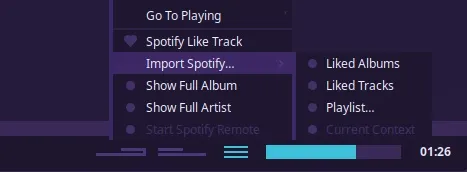
Most Spotify specific functions will appear in the playback hamburger menu as shown above. From this menu you can import your liked tracks, your playlists etc.
You can also import via Spotify URL’s by pressing Ctrl + v to paste them on the main window. This will import the album to the end of the current playlist in the case of album URL’s, or create a new playlist in the case of artist and playlist URL’s.
You can Search for albums and artists. To do so, type your search query (this will trigger the standard global search). Then, press Tab to switch from local search to Spotify search.
Remote control monitor
Section titled “Remote control monitor”You can monitor active playback from a remote Spotify device by clicking the bottom hamburger menu > Start Spotify Remote. In this mode Tauon will just show you what’s playing. If you manually start playing a Spotify track in Tauon, Tauon will take over control of playback.
Audio Playback
Section titled “Audio Playback”There are two modes of audio playback:
- Through an external Spotify player such as the official Spotify client app.
- This is the default setting.
- Tauon will try launch Spotify automatically if an instance isn’t detected.
- Through Tauon itself.
- See MENU > Settings > Accounts > Spotify > Enable local audio playback.
- If you have a Spotify Connect speaker you want to use, you’ll need to do the switching using the Spotify app.
- You can refresh a playlist in Tauon by right clicking the playlist tab and clicking “Regenerate”.
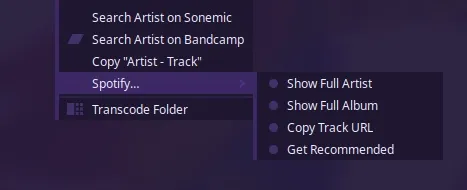
- There are some track context menu functions such as Show Full Album and Get Recommended Tracks.