

Mini Mode
Mini mode shrinks Tauon to a small player window. There are several styles:
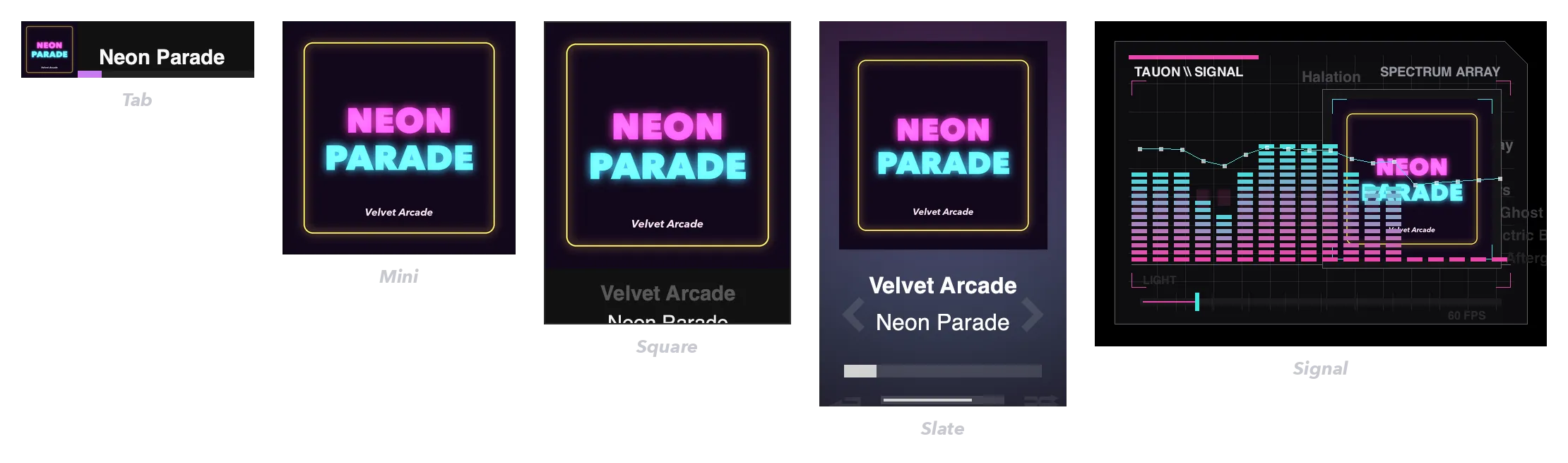
| Style | Description |
|---|---|
| Tab | A slim bar with a small cover, the track title and progress |
| Mini | Just the album art |
| Square / Square Large | The album art with the artist and title below |
| Slate | Art, artist and title, with skip arrows and a seek bar |
| Signal | A retro spectrum display with the album art |
Enter mini mode
Section titled “Enter mini mode”- Press
F8. - Open the playback menu (☰ at the right of the bottom panel) and choose a style from Mini Mode.
- Right-click empty space in the bottom panel and choose a style.
Using mini mode
Section titled “Using mini mode”- The usual playback controls are available, depending on the style.
- Right-click to play or pause.
- Middle-click (or
Shift-click) switches between Tab and Square.
To keep the mini player above other windows, turn on Mini-mode always on top in Settings › Appearance › Window.
Return to the full window
Section titled “Return to the full window”Press F8 again, or double-click the title area of the mini player.